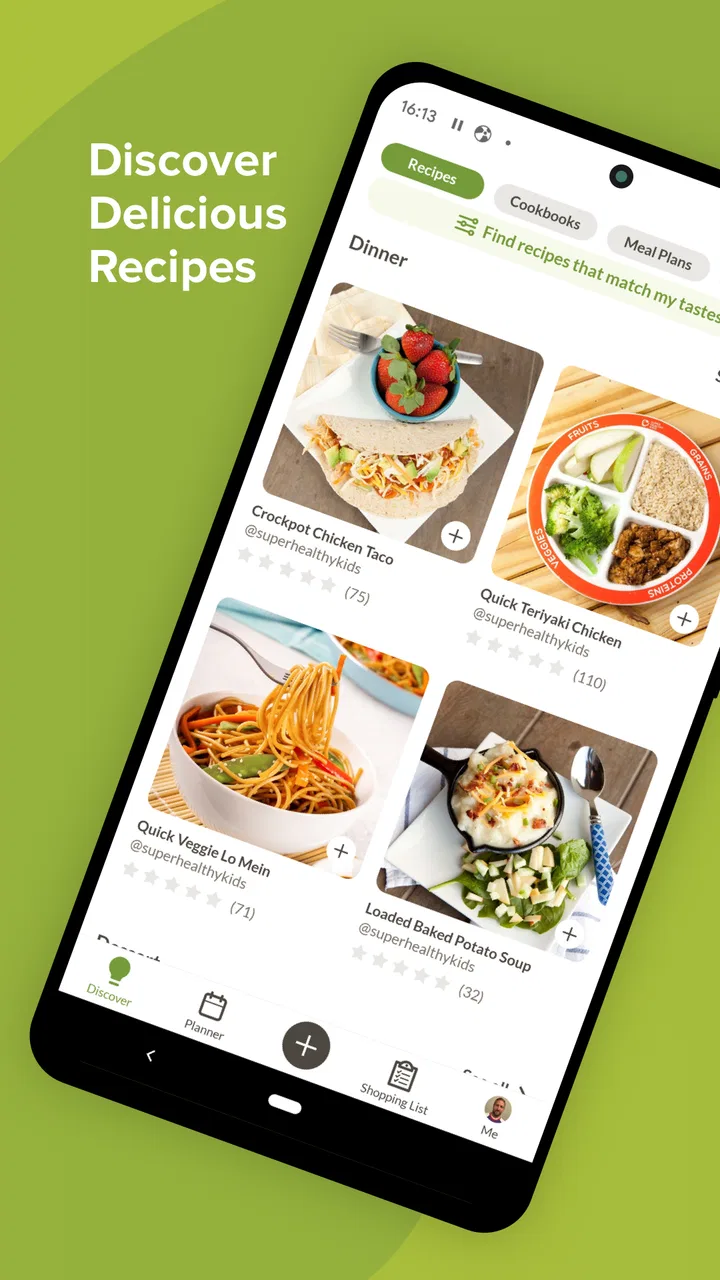
Prepear Meal Planner & Recipes
- 3.8
- Rating
- 100.00K
- Installs
- Free
- Price

 Analysis by App-foxy
I approached Prepear Meal Planner & Recipes as the kind of food app you open when dinner is still an idea rather than a decision. Instead of treating recipes, shopping, and weekly planning as separate chores, it brings them into one cooking-focused workspace. That sounds simple, but the real value appears when you use the app repeatedly: a recipe can influence the plan, the plan can shape the grocery list, and the list can make a rushed supermarket visit less chaotic.
My overall impression is positive, with an important qualification. This is most useful for people who want structure around home cooking, not for someone who only needs a quick recipe search. The experience also depends on how reliably your phone can load content when you need it. When the connection is good, the app feels like a practical bridge between deciding what to eat and actually buying the ingredients. When connectivity becomes uncertain, I become more cautious about relying on it as my only kitchen reference.
How Prepear fits into a real weekly routine
The app comes from Prepear, and it sits in the Food & Drink category. It is free to install, with optional in-app purchases ranging from $0.99 to $119.99 per item. That price structure makes it easy to try without committing immediately, although anyone considering paid content should pay attention to what is included before building an entire routine around it.
You May Also Like

 Blood Strike: 2.5 Anniversary
Blood Strike’s Loadouts Turn Every Drop Into a Tactical Gamble
A close look at Blood Strike’s custom loadouts: how fast access to signature weapons reshapes its battle royale rhythm, rewards preparation, and narrows the gap between fights.

 Pandora - Music & Podcasts
Pandora’s Music Is Easy to Start, but Harder to Recover
Pandora’s strength is its low-effort path from a seed to a station. Its weak spot is how much confidence it asks you to place in connection, setup, and quiet recovery.

 8 Ball Pool
 Is Built on Rivalries, Rematches, and Routine
A close look at the rivalries, rematches, shared routines, and unanswered safety questions that turn a quick pool match into a persistent mobile community.

 Samsung Music
’s Quiet Strength Is Playing What You Already Own
Its reach comes less from spectacle than from dependable access to a personal library. That simplicity is both the app’s strongest retention engine and its ceiling.

 AccuWeather: Weather Radar
AccuWeather Review: A Quick, Clear Forecast for Everyday Decisions
For everyday plans, the best forecast is the one you can understand quickly. AccuWeather makes rain timing, radar, and local conditions easy to act on, with a few trade-offs.

 Hill Climb Racing
Why Hill Climb Racing Still Turns Crashes Into One More Run
A tiny car, a bumpy hill and one more upgrade: Hill Climb Racing keeps resurfacing because its simple chaos makes every near-miss feel personal.
More From Our News Desk
View All News


In everyday use, I found the planning idea more important than any single recipe. A recipe app can be enjoyable for browsing, but browsing alone does not solve the familiar problem of reaching the end of the day with no plan. Prepear is better suited to the moment when I want to look ahead, choose several meals, and turn those choices into a shopping task rather than keeping everything in my head.
A realistic example is a busy Sunday evening. I can think through the next few days, choose something manageable for a work night, reserve a more involved meal for a day with extra time, and use the grocery-list side of the experience to organize what needs to come home. The useful insight here is that planning should follow my schedule, not just my appetite. A recipe that looks attractive on a quiet afternoon may be a poor choice after a long commute.
The strongest part of Prepear is the connection between meal decisions and shopping preparation. That connection reduces the small bits of mental work that usually cause meal planning to collapse. I do not have to remember every ingredient while moving between a recipe page and a separate notes app. The trade-off is that I need to invest some time at the beginning. This is not a magic “tell me what to eat” button; it rewards users who are willing to make choices in advance.
Planning is more useful when you think in patterns
I would not use the planner by filling it with ambitious meals simply because they look appealing. A better approach is to create a realistic mix: one dependable meal, one recipe that uses fresh ingredients quickly, and one flexible option for a day when plans change. This makes the grocery list more practical and prevents the common mistake of buying ingredients for several elaborate dishes that never get cooked.
Another useful habit is to review the list before leaving home. Meal planning tools can make a list feel complete while still leaving room for duplicate purchases or items already in the cupboard. I treat the generated list as a starting point, then edit it mentally or within the app as needed. That small review is especially important when several selected recipes share similar ingredients.
What the app feels like on a phone
Prepear makes the most sense on a mobile device because meal decisions happen in mobile situations: standing in a supermarket aisle, checking dinner ideas during a break, or looking at a recipe while moving between the counter and the refrigerator. Its usefulness comes from having planning and cooking references close at hand rather than scattered across paper, browser tabs, and messages to myself.
Still, a phone is not always an ideal kitchen screen. The display is smaller than a tablet or laptop, and cooking often involves interruptions. I prefer to inspect the recipe and shopping needs before I start cooking, rather than repeatedly unlocking the phone with wet or messy hands. That is not a flaw unique to this app, but it changes how I use it: preparation beforehand makes the live cooking stage less dependent on constant phone interaction.
The app is aimed at a Teen audience, which feels consistent with a general household planning tool rather than something designed only for professional cooks. I would recommend it to students, couples, families, and anyone trying to reduce takeout by making home meals easier to organize. It can also help a person who enjoys recipes but has trouble turning inspiration into a repeatable week.
I would be less enthusiastic for someone who already has a highly efficient system built around a paper notebook, a familiar notes app, or a dedicated grocery-list tool. Moving to Prepear only makes sense if the connection between recipes and planning solves a problem that the existing system does not. If all you want is an enormous searchable recipe collection, a recipe-first service may feel quicker. If all you want is a bare shopping checklist, a simple list app may involve less setup.
Connectivity changes the experience at key moments
The network matters most when I am discovering recipes, moving through meal-planning content, or checking information during a shopping trip. Those are precisely the moments when convenience matters. At home, a stable connection makes the experience feel smooth enough to browse and adjust plans. Away from home, the value depends more heavily on whether the content I need is already available when I reach it.
This creates an important difference between planning and cooking. Planning is usually easier when I have time and a reliable connection. Cooking is more time-sensitive: once ingredients are on the counter, I do not want to spend several minutes troubleshooting a page or waiting for content to appear. My practical advice is to open the recipes and review the ingredient requirements before starting. I would also avoid treating the app as my only source of instructions for an important meal if my connection is unreliable.
That does not make Prepear unusable in a mobile environment. It simply means the best workflow is deliberate. I use connected time for discovery, selection, and list preparation. Then I reduce surprises before leaving for the store or beginning to cook. This separation helps the app feel dependable without assuming that every part of the experience will behave identically in every network condition.
Supermarket use: helpful, but not completely hands-off
The grocery-list function is most valuable when I use it as a guide rather than an unquestionable inventory. In a supermarket, I may discover that an ingredient is unavailable, too expensive for the week, or sold in a size that does not match the recipe. A good meal-planning routine needs room for substitutions, and that is where my own judgement still matters.
There is also a connectivity trade-off in the store. Grocery aisles can be crowded, signal quality can vary, and constant browsing can consume attention as well as mobile data. I prefer to prepare the list before entering the shop, then use the phone for confirmation and changes instead of repeatedly rebuilding the plan in the middle of the trip. This is one of the more useful ways to keep the app from becoming a distraction.
For households shopping together, the list can also serve as a shared reference point, but I would not assume that every person will interact with it in exactly the same way. The more people involved, the more important it becomes to agree on substitutions and quantities before shopping. The app can organize the plan, but it cannot resolve a family disagreement about whether an ingredient is essential.
What happens when a connection fails
Network problems are most frustrating when they arrive after I have already committed to a recipe. A page that loads during planning may not behave the same way later in a basement kitchen, a crowded store, or a place with weak reception. I therefore treat advance review as a form of recovery planning: check the recipe, note the important ingredients, and understand the basic sequence before the meal begins.
If something does not load, I would first return to a more stable connection rather than repeatedly tapping the same control. If I am shopping, I can work from the ingredients I already reviewed and make a sensible substitution. If I am cooking, I would rather pause briefly and use the information I prepared earlier than depend on a last-second search. This approach is less glamorous than seamless access, but it is realistic and prevents one technical interruption from ruining dinner.
The broader lesson is that Prepear works best when it supports a routine instead of carrying the entire routine by itself. The app can help me make decisions, but I still benefit from basic preparation. That is particularly true for users with limited data, inconsistent reception, or a habit of starting meals spontaneously.
Using it without wasting data or attention
People who are careful with mobile data should make their main planning decisions while connected to a trusted network. Browsing recipe content can become an open-ended activity, especially when one idea leads to another. I try to choose a small group of realistic meals rather than scrolling indefinitely. That saves time and keeps the grocery list tied to actual intentions.
There is a second kind of data to protect: personal planning information. A meal plan can reveal routines, preferences, and household habits. I do not add more personal detail than necessary, and I review any account or purchase choices carefully. The app is free to start, but the presence of optional purchases means I would check the pricing screen before selecting anything that appears to be part of a premium experience.
My most effective low-friction workflow is simple:
Choose meals when the connection is stable and I have enough time to think.
Review ingredients and remove anything I already own or do not intend to buy.
Check the plan against my actual schedule, including evenings when cooking is unlikely.
Open the selected recipes before shopping or cooking so I am not discovering requirements at the last moment.
This process also highlights a subtle limitation: the app can organize poor decisions just as efficiently as good ones. If I select too many meals, ignore preparation time, or fail to account for leftovers, the resulting plan may look tidy but still be unrealistic. The human review step is not optional if I want the system to save effort.
Who will get the most from Prepear?
I see the best fit in people who want to cook more consistently but struggle with the planning around cooking. A beginner can use it to move from vague inspiration toward a concrete shopping plan. A busy household can use it to reduce the nightly “what should we make?” discussion. Someone trying to spend less on unplanned food may appreciate having meals chosen before hunger takes over.
It is also useful for a person who enjoys variety but needs boundaries. Instead of searching endlessly every evening, I can choose a manageable set of recipes and let the week have a shape. The app becomes less about collecting ideas and more about selecting which ideas deserve ingredients, time, and attention.
On the other hand, I would skip it if my priority is strict nutrition tracking, detailed budget management, or highly specialized dietary control unless the specific tools I need are clearly available in the version I choose. I would also skip it if I dislike planning altogether. No meal planner can make advance decisions disappear; it can only make those decisions easier to organize.
Version, maturity, and day-to-day confidence
Prepear has been available since October 18, 2017, and the current version is 26.4.11. That gives the app a longer history than a newly launched experiment, while the current version still matters because mobile behavior can change over time. I judge it as an established planning concept rather than a novelty, but I would still keep the app updated and pay attention to how it behaves on my particular phone.
Its average rating is 3.8 from around 1.1 thousand ratings, with more than three hundred written reviews, and it has passed 100 thousand installs. Those figures suggest a product with a real user base but not one I would describe as universally loved. That matches my experience: the central idea is useful, yet the value depends strongly on whether the workflow matches the way I shop and cook.
The rating also reinforces why I would test the free experience before paying for anything. A meal-planning app can be excellent for one household and unnecessary for another. I would spend a week using it with ordinary meals, checking whether the recipe-to-list process genuinely saves time. If I still find myself exporting everything into another tool, the paid options are unlikely to fix the underlying mismatch.
My connectivity verdict
Connectivity does not define every part of Prepear, but it shapes the moments where the app is supposed to be most convenient. Stable access makes browsing, planning, and checking recipes feel connected. Unreliable access makes preparation more important and exposes the difference between a helpful organizer and a guaranteed kitchen fallback.
I recommend trying Prepear if you want recipes, meal planning, and grocery preparation to live in one food-focused workflow. I especially recommend it to people who repeatedly buy ingredients without a plan or decide on dinner too late. Start free, build a modest plan, and test it in the places where you normally shop and cook.
I would not recommend making it your only safety net for recipes when your connection is unpredictable. Review important meals ahead of time, keep your shopping decisions practical, and use your own judgement when ingredients or schedules change. With that approach, Prepear is a useful planning companion rather than a replacement for common sense. Its best quality is not that it removes every cooking problem, but that it turns several disconnected tasks into one routine I can actually follow.
FAQs for Prepear Meal Planner & Recipes
01What is Prepear Meal Planner & Recipes, and what can I do with it?
Prepear is a meal-planning and recipe organization app designed to help you decide what to cook, organize recipes, and create shopping lists. During testing, its main value was the way it brings meal ideas, weekly planning, and ingredients together in one place. You can browse recipes, save favorites, arrange meals on a calendar, and prepare a grocery list based on your selected dishes.
02Does Prepear include recipes for different diets and eating preferences?
Prepear offers a broad recipe collection with options that may suit different tastes, cooking abilities, and dietary preferences. You can search and browse recipes using available categories or filters, although the exact selection can vary by region and app updates. Users with allergies or strict medical dietary requirements should always check every ingredient and recipe detail rather than relying only on labels.
03Can Prepear automatically create a grocery or shopping list?
Yes, one of Prepear’s most useful features is its ability to turn planned recipes into a shopping list. After adding meals to your plan, ingredients can be collected in one place, helping you avoid repeatedly checking individual recipes at the store. You may still need to review quantities, remove items already at home, and adjust the list for package sizes or personal preferences.
04Is Prepear free to download, and are there paid features?
Prepear can generally be downloaded and used without an upfront purchase, but some content or advanced features may require a subscription or in-app payment. The available plans, pricing, and trial conditions can change over time and may differ between Android and iOS. Before confirming a subscription, review the store listing and the in-app billing screen carefully, including renewal terms.
05Does Prepear work well for busy families or people who cook at home regularly?
Prepear is particularly useful for people who want to reduce the daily effort of deciding what to cook. Its meal calendar, saved recipes, and shopping-list tools can make weekly preparation easier for individuals, couples, or families. However, the experience depends on entering preferences and reviewing recipes carefully. It is a planning aid, not a replacement for checking ingredients, portions, cooking times, or nutrition needs.
Pros
- Creates organized weekly meal plans in just a few taps.
- Builds shopping lists automatically from selected recipes.
- Supports recipe saving and personal recipe organization.
- Offers useful filtering for dietary needs and ingredients.
- Helps reduce food waste by planning meals around available items.
Cons
- Many premium recipes and planning tools require a subscription.
- The large recipe library can feel overwhelming for new users.
- Some meal plans may require ingredients unavailable in every region.
- Advanced customization may take time to learn.
- Recipes and shopping lists may need manual adjustments for household sizes.

Prepear Meal Planner & Recipes
Gallery